




Description
Download Windows and Office Genuine ISO Verifier – verify Windows ISO, verify Office ISO, check software authenticity, genuine software tool, Microsoft software verification
Overview
Windows and Office Genuine ISO Verifier is a specialized utility designed to validate the authenticity of Microsoft Windows and Office software installations. The primary purpose of this tool is to help users confirm whether their ISO or executable files are genuine, unaltered, and officially distributed by Microsoft. This verification is crucial for avoiding risks associated with counterfeit, tampered, or pirated software, which may lead to security vulnerabilities, failed updates, or system instability. The app is particularly beneficial for IT professionals, system administrators, and individual users who frequently install or reinstall operating systems and productivity suites.
By leveraging a comprehensive database of cryptographic hash functions, the tool performs rapid integrity checks on .ISO and .EXE files. This capability enables users to verify software legitimacy in seconds, minimizing downtime and reducing the need for reinstallation due to corrupted or modified files. The target audience includes both technical and non-technical users who value software integrity and seek reliable validation without deep technical knowledge. The developer, Eddie C. Reardon, has positioned the tool as a lightweight, efficient solution for a critical need in software management.
Although the developer did not provide additional technical details about the development background or methodology, the app’s functionality aligns with industry standards for digital signature and file integrity verification. Its role in the broader software ecosystem is significant, especially in environments where software authenticity is paramount. The tool contributes to a safer digital environment by empowering users to make informed decisions about their software sources.
Key Features & Functionality
- Extensive Compatibility – Supports a wide range of Microsoft Windows versions, from Windows 95 to Windows 11, as well as multiple versions of Microsoft Office up to two decades old. This ensures broad usability across legacy and modern systems.
- Quick Verification Process – Analyzes ISO or executable files using a pre-built database of verified hash values, delivering results in seconds. This speed is ideal for users managing multiple installations or performing urgent system repairs.
- Tampering Detection – Identifies unauthorized modifications to software files by comparing them against official Microsoft hash signatures. This feature helps prevent the use of compromised or maliciously altered software.
- User-Friendly Interface – Features an intuitive layout with minimal technical jargon. Users can load files, initiate verification, and interpret results without requiring advanced technical training.
- Peace of Mind Through Validation – Offers assurance that the software being used is officially distributed, reducing concerns about compatibility, update failures, or security risks tied to counterfeit software.
For example, a user preparing to reinstall Windows on a new machine can use the tool to verify that their downloaded ISO file matches Microsoft’s official release. Similarly, a business IT team managing software deployment can use the tool to audit the integrity of their software library before distribution. The verification process is non-invasive and does not alter the original file, preserving its intended use.
Interface, UX & Performance
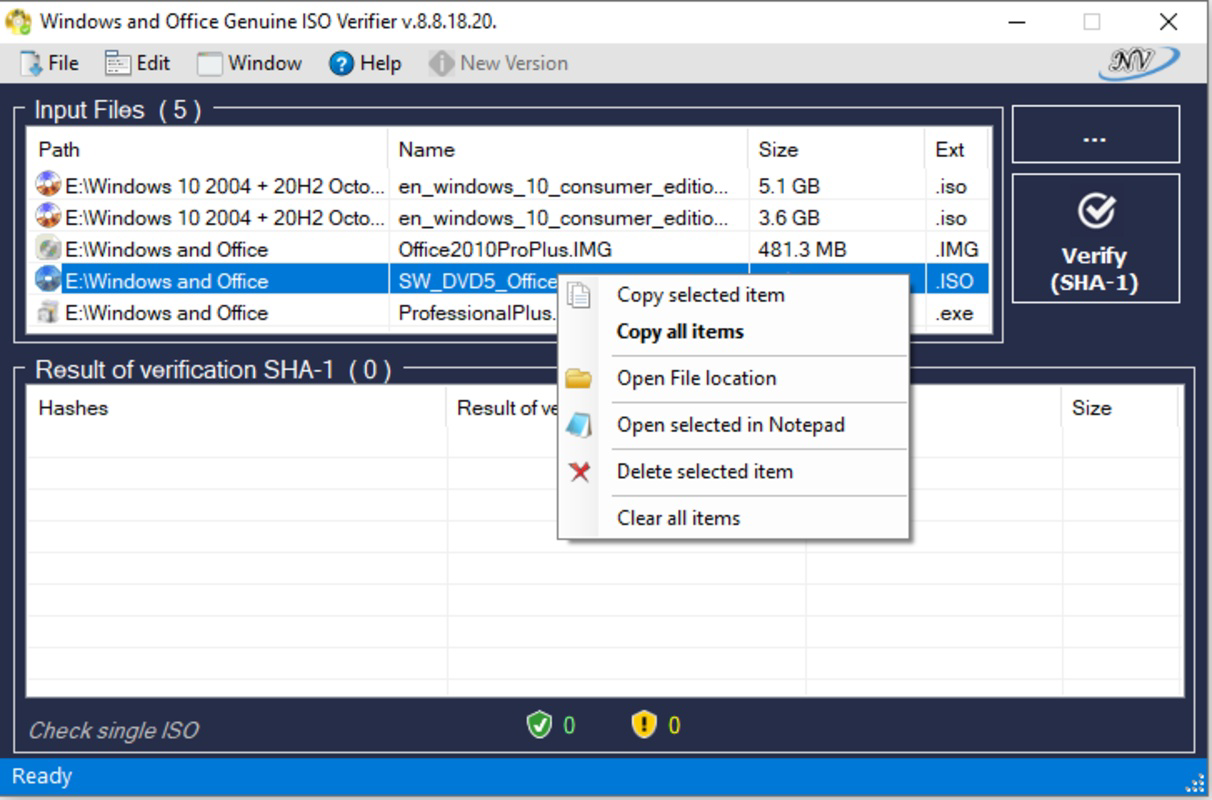
The application features a clean, minimal interface focused on core functionality. Navigation is straightforward, with a central file upload area and a clear display of verification results. Users can drag and drop ISO or EXE files directly into the interface, which streamlines the workflow. The layout avoids clutter, ensuring that essential controls remain accessible without overwhelming the user.
Although the developer did not list formal performance metrics, the tool is designed to operate efficiently on a wide range of Windows systems. Its small file size of 1.5 MB suggests low resource consumption, making it suitable for older or low-spec machines. The application responds promptly to file inputs, with verification completed in seconds, indicating strong responsiveness and stability during typical use.
Performance across different device categories was not specified, but the lightweight nature of the tool implies compatibility with both modern and legacy Windows environments. The application runs without requiring installation, allowing for portable use from USB drives or temporary directories. While no error logs or crash reports were mentioned, the tool’s focus on simplicity suggests a stable execution environment for standard verification tasks.
Platform Compatibility & Technical Requirements
Windows and Office Genuine ISO Verifier is designed exclusively for the Windows platform. The current version is 2.1, with a file size of 1.5 MB, making it highly portable and easy to distribute. The developer did not specify minimum OS requirements, nor did they list compatibility with specific Windows editions or versions beyond general support for Windows 95 to Windows 11.
Given its small footprint and lack of installation dependency, the tool is likely compatible with a broad range of Windows systems, including both 32-bit and 64-bit architectures. However, specific hardware or software prerequisites were not disclosed. Users are advised to ensure their system meets general Windows compatibility standards when running the application.
As a standalone executable, the tool does not require administrative privileges for basic operation, though file access permissions may vary depending on the location of the ISO or EXE being verified. The absence of installation steps enhances usability and reduces the risk of system conflicts.
Pros and Cons
- Free to download and use with no hidden costs
- Lightweight at only 1.5 MB, suitable for low-resource systems
- Fast verification process, delivering results in seconds
- Supports a wide range of Windows and Office versions
- Intuitive interface suitable for non-technical users
- Non-invasive—does not modify original files
- Compatibility with older Windows versions not fully detailed
- No official update notifications or auto-update feature
- Developer did not provide technical documentation or source code
- Platform limited to Windows only
- Specific system requirements not disclosed
FAQ
Is Windows and Office Genuine ISO Verifier safe to use?
The tool is a standalone executable that does not require installation and does not modify system files. It only reads and compares file hashes, making it safe for use on personal and professional systems.
Can I use this tool on Windows 10 or Windows 11?
Yes, the application supports Windows 10 and Windows 11, as well as older versions from Windows 95. The developer confirms broad compatibility across the Windows ecosystem.
Does the tool require an internet connection?
Verification is performed locally using an embedded database of hash values. An internet connection is not required for basic file integrity checks, though updates to the hash database may require online access in the future.
Is the tool available for macOS or Linux?
No, the tool is currently available only for Windows. There is no official version for macOS or Linux platforms.
How often should I update the tool?
While the developer did not specify an update schedule, it is recommended to check for new versions when available, especially if new Windows or Office releases are introduced. The tool may be updated to include additional hash signatures for newer software versions.
Final Thoughts
Windows and Office Genuine ISO Verifier delivers a focused, reliable solution for validating the authenticity of Microsoft software. Its lightweight design, fast performance, and intuitive interface make it accessible to both novice and experienced users. The ability to verify software integrity in seconds reduces the risk of installing tampered or counterfeit files, which is increasingly important in today’s digital landscape.
While the tool lacks advanced features like automatic updates or detailed logging, its core functionality is robust and well-executed. It fills a vital gap in software management, especially for users who prioritize security and system stability. For anyone working with Windows or Office ISOs—whether for personal use, system recovery, or enterprise deployment—this tool offers significant value.
Download Windows and Office Genuine ISO Verifier now to ensure your software is genuine, secure, and ready for use.
Guides & Tutorials for Windows and Office Genuine ISO Verifier
How to install Windows and Office Genuine ISO Verifier
- Click the Preview / Download button above.
- Once redirected, accept the terms and click Install.
- Wait for the Windows and Office Genuine ISO Verifier download to finish on your device.
How to use Windows and Office Genuine ISO Verifier
This software is primarily used for its core features described above. Open the app after installation to explore its capabilities.
User Reviews for Windows and Office Genuine ISO Verifier 0
No reviews found


